More than 2.9 billion people worldwide were expected to use QR codes by 2025. QR codes are helpful for contactless fundraising, events, and sharing information about your nonprofit. These nifty codes help increase your campaign visibility, donor engagement, and donations.
In this article, I’ll share how your nonprofit can effectively utilize QR codes to raise more and better engage your donors. First, I’ll explain the difference between the two types of QR codes.
Types of QR Codes for Nonprofits
There are two main types of QR codes: static and dynamic.
Static QR codes are straightforward, baseline codes; they can’t be altered and don’t track data. Static QR codes send supporters to a single webpage where the link will not change in the foreseeable future. They’re ideal for one-off events like galas and fundraisers.
Dynamic QR codes track how many times they’ve been scanned, where they’ve been scanned, and the device type that scanned them. They also enable you to update or change the URL. These are ideal if you’re looking for a long-term, evergreen QR code that will live on something difficult or expensive to update, like business cards or high-quality signage.
Below, I’ll explain how to use static and QR codes to support your nonprofit fundraising initiatives.
If you’re raising funds for an upcoming program, building plan, or emergency relief, use a static QR code to take supporters to an information site or your donation page.
2. Evergreen donation pages
A dynamic QR code is a great option for evergreen nonprofit donation pages.
Your event attendees or on-site visitors can quickly scan and make a one-time or recurring donation without having to navigate to your website or social media platform.
3. Events and programs
For one-off events and programs, leverage a QR code to share information about your nonprofit organization and programs.
If your event pairs with an ongoing calendar or a series of events, use a QR code to direct supporters to the full calendar of events.
4. Sponsor links
If your event, program, or exhibition has a sponsor, share information and fulfill obligations with a QR code.
Signage can be streamlined with a logo and code that directs your attendees to a site with all the relevant information your sponsor may want to share.
5. Information pages
Anyone who’s put together ad campaigns or distributed posters knows how difficult it can be to get all your nonprofit information onto a digestible, attractive, and often small sign.
QR codes are a nifty way to direct potential readers toward more information. A quick scan shares more about your organization, campaign, or event.
6. Social media pages and blogs
QR codes help increase your followers on social media and online blogs. Include your social media handle or blog link, and add a call-to-action that tells people what you want them to do.
This is a quicker and more foolproof way to direct supporters to your page than listing your handles or URLs.
7. Addresses, contact information, and directions
Your nonprofit can use a QR code to link to a:
Pinned location on Google Maps.
Page with detailed instructions covering different forms of transportation or origin areas.
Page with your address and contact information.
QR codes are a fantastic way to direct people to a specific place, especially if it isn’t your typical location.
8. Galas
QR codes make access to information easier for special nonprofit events like galas.
Use QR codes to:
Link to digital RSVPing or check-in.
Share directions or contact information.
Link to event information or your registration page.
Quickly solicit donations by directing attendees to your donation page.
You can even include discount codes or freebies as part of your thank-you package.
9. Surveys
It can be difficult to get people to fill outsurveys, so the easier and faster the process, the better.
Including a QR code linking to a post-event survey at your location enables anyone with a smartphone toscan the code and quickly complete your survey before they leave.
10. Business cards
Including a QR code with a vCard that matches your physical business card significantly increases the likelihood of your new contact saving your information. It also makes networking smoother and more natural.
At your nextnonprofit conference, hand someone your business card with a QR code that they can scan to add you to their contacts.
No business cards? Have a vCard-linked QR code on your desk or as an image on your phone that allows for a quick scan – no physical card needed.
Where to Place QR Codes
Add QR codes to printed materials (business cards, posters, flyers, catalogs, wayfinding signs, etc.) or share them digitally.
Here are some placement ideas for your QR code:
Informational signage
Institutional signage
Wayfinding signs
Posters or flyers
Advertisements
Business cards
Keep in mind that you’ll want them visible.
Pro tip: Supplement QR codes with branded materials and add instructions about why someone should scan them – especially if you won’t be appointing a representative nearby.
How to Create Your QR Code with Donorbox
Donorbox gives you a free QR code for every campaign you create. Your QR code takes your donors or potential donors to your donation form or Donorbox-hosted campaign page.
To access yours, go to your Donorbox dashboard. Navigate to your desired campaign, and click on the edit icon to enter the campaign editor. Within the “Campaign Details” tab, scroll down to the “Additional Settings” section.
Here’s where you’ll be able to view and download your PNG or SVG QR code.
To customize the size and format of your QR code before downloading it, simply select “View Code” > “Customize.”
Pro tip: Print your QR code and use it to promote your campaign at events, programs, or through local businesses.
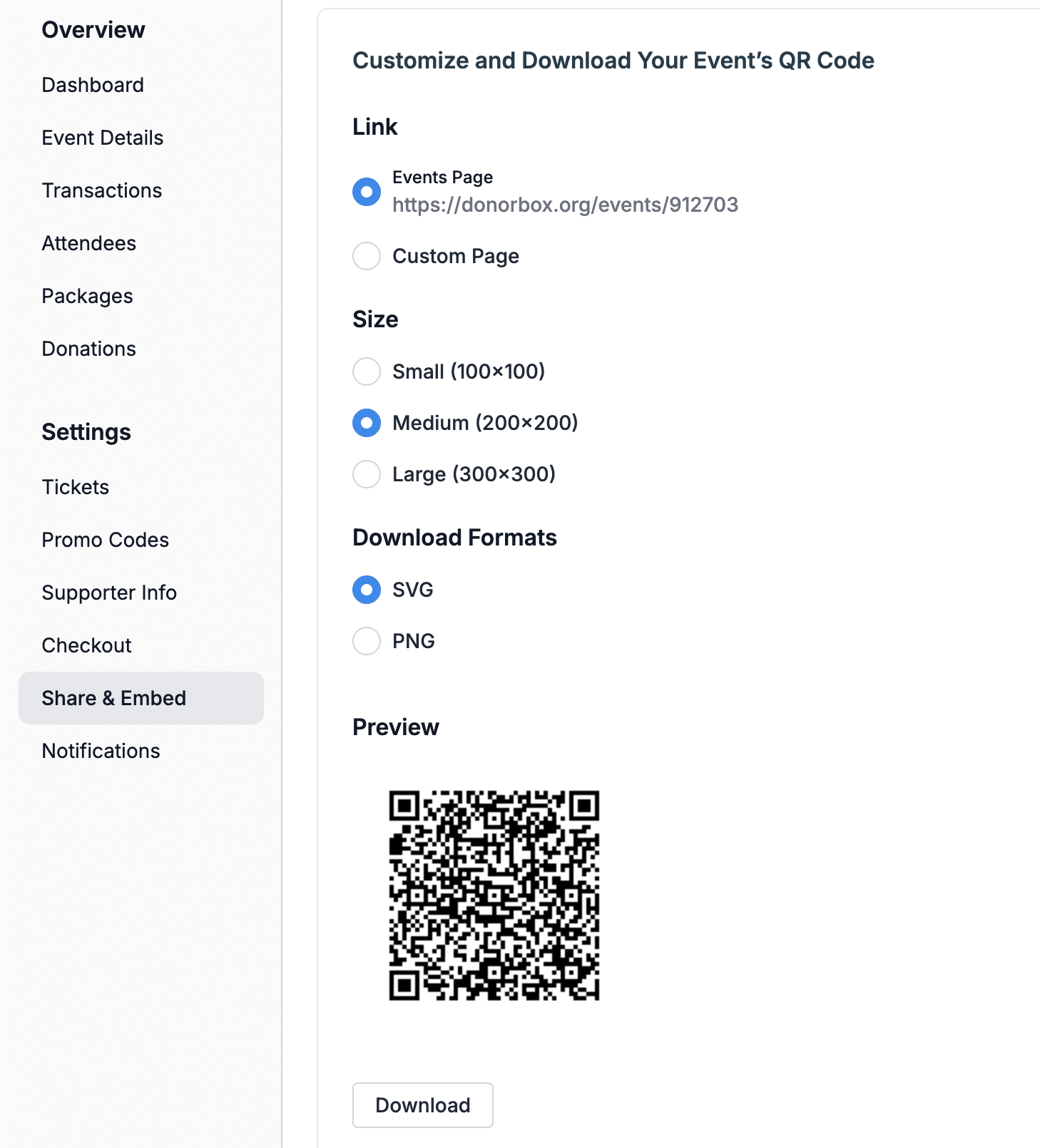
Donorbox also provides QR codes for events. Simply create a new event or edit an existing one on your Donorbox dashboard. Then, navigate to the “Share & Embed” tab to customize and download your QR code so supporters can easily purchase tickets and find event details using mobile devices.
Here are some best practices for using your QR code at your nonprofit events and beyond:
The pattern is the code. Hence, don’t overlay images, logos, watermarks, or text on an already-generated QR code.
Keep about a quarter-inch of blank space around the code so cameras or apps can read it. If you want to place instructions nearby, maintain a ring of blank space around the code.
Always test your QR code before sharing it. Confirm that the code is scannable and directs you to the appropriate page before putting it out.
QR codes are still new to some, and older phones don’t have built-in software. If you think this might be new or confusing for your audience, place an attendant nearby to answer questions.
Ensure your volunteers and team members know how to use your QR code. This inspires confidence and will encourage people to use your QR code.
QR codes are a great way to engage more donors, but make sure you follow these tips to avoid potential frustration and ensure they are effectively utilized.
Conclusion
QR codes can amplify engagement and increase donations to your fundraising campaigns. They also streamline your information-sharing processes.
Donorbox makes it easy for you to connect with more donors and raise more funds by offering free QR codes for every campaign you create. Explore all Donorbox’s fundraising features and tools here.
If you haven’t already, sign up to start fundraising in minutes.
For more fundraising tips, visit theNonprofit Blog. Subscribe to the monthly newsletter for an exclusive list of resources sent to your inbox.
Frequently Asked Questions
1. What is a QR code?
Quick response codes (QR codes) are two-dimensional codes that people can quickly scan using their smartphones to visit a website, social media page, PDF, vCard, or unique landing page. Because the code is designed to take you to a specific digital place, it is built around the link you want to direct people to and will take them there in one to two steps.
2. What are two types of QR codes?
QR codes come in two forms: static and dynamic. Static QR codes can’t be changed and don’t track data. Dynamic QR codes track how many times and where they’ve been scanned, and allow you to update or change the URL.

 Join the fundraising movement!